Verdict: The ProtoArc XKM01 Pro is a travel keyboard-and-mouse kit for people who need a full 105-key layout, a numpad, and visible keys in dim rooms. Its three-level white backlight is the clear upgrade over the base XKM01, but the keyboard and mouse switch devices separately and USB-C is for charging only. This source-based analysis covers the Black XKM01 Pro, model XKM01 Pro, Amazon US ASIN B0GGJ5Y545; we have not tested it, and independent hands-on coverage of the Pro was not found. ProtoArc specifications ProtoArc FAQ
Pros
- Full-size 105-key foldable layout keeps the numpad and F1–F12 row.
- Three levels of white backlighting help when ambient light is low.
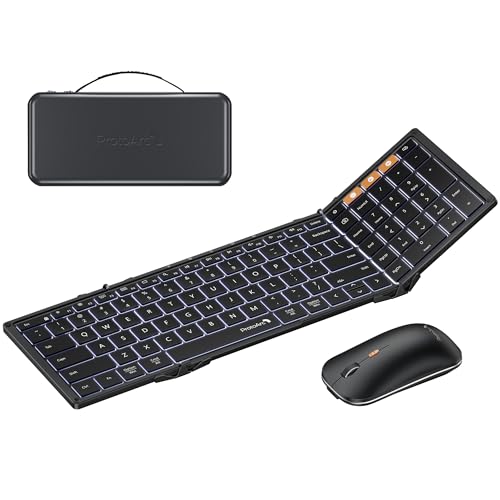
- The kit includes a mouse, hard case with phone stand, and a receiver alongside two Bluetooth profiles. ProtoArc specifications
Cons
- Switching the keyboard to another device does not switch the mouse with it.
- The USB-C ports charge the two devices; they do not provide a wired data connection.
- ProtoArc says certain macOS shortcuts may not work through the 2.4 GHz receiver; Bluetooth is the safer Mac connection. ProtoArc FAQ
Is the XKM01 Pro meaningfully different from the base XKM01?
The backlight is the practical reason to choose the Pro. ProtoArc specifies three brightness levels of white lighting on the Pro, while its base XKM01 page says the keyboard has no backlight. Both models keep the 105-key foldable layout, numpad, travel mouse, case and stand. If you work in dark hotel rooms or evening spaces, the light may earn its place; otherwise the base model covers the same broad travel setup without it. XKM01 Pro specifications XKM01 specifications
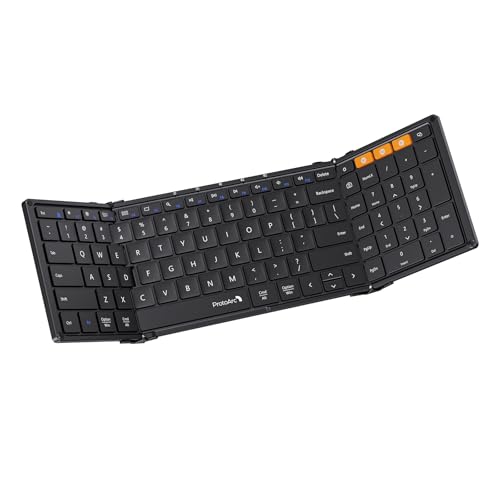
The Pro’s keyboard folds to about 8.46 × 4.68 × 0.78 inches and unfolds to a full-size layout. That makes it easier to pack than a rigid keyboard, but it still needs a stable, broad surface when open. The included hard case has a folding phone stand, not a laptop stand. Its slim mouse has three DPI settings; users who need a larger palm-filling mouse should treat that as a fit question, not an ergonomic claim. ProtoArc specifications
Does three-device support make switching seamless?
The keyboard and mouse each connect over two Bluetooth profiles or the included 2.4 GHz receiver, but their channel controls operate independently. When moving a complete setup from a laptop to a tablet, plan to switch both peripherals rather than expecting one action to retarget the pair. They can still be useful across three devices; the extra step is a small but real travel-work compromise. ProtoArc FAQ
ProtoArc lists Windows, macOS, ChromeOS, iPadOS and Android compatibility. Its FAQ specifically recommends Bluetooth on a Mac because some macOS-specific shortcuts may be unsupported over the receiver. USB-C charges each device, while normal input travels wirelessly; this is not a wired fallback when a receiver or Bluetooth connection is unavailable. ProtoArc specifications ProtoArc FAQ
ProtoArc XKM01 Pro Black specifications
| Specification | Details |
|---|---|
| Model / color | XKM01 Pro / Black |
| Amazon US ASIN | B0GGJ5Y545 |
| Keyboard | Foldable 105-key layout, numpad, F1–F12, three-level white backlight |
| Wireless | Two Bluetooth profiles plus 2.4 GHz USB receiver; keyboard and mouse switch independently |
| Charging | USB-C charging only for keyboard and mouse |
| Mac note | Bluetooth recommended for full shortcut support |
Buy the XKM01 Pro if backlighting and a full-size foldable layout solve a real travel-work problem. Skip it if you need wired data, expect the keyboard and mouse to switch together, or already prefer your laptop’s keyboard. Confirm the Black XKM01 Pro and ASIN B0GGJ5Y545 on the product page before purchase; the base XKM01 review covers the unlit Gray model. ProtoArc specifications Amazon US destination
Specifications
Documented facts
Key specifications
- Keyboard
- Foldable 105-key full-size layout with numpad and F1–F12 keys; 0.65-inch keycapsProtoArc
- Backlight
- Three-level adjustable white backlightProtoArc
- Wireless connection
- Bluetooth 5.1 and included 2.4 GHz USB receiver; keyboard and mouse select channels independentlyProtoArcProtoArc
- Mac compatibility
- Use Bluetooth for full macOS shortcut support; some shortcuts may be unsupported over 2.4 GHz receiverProtoArc
- Model
- XKM01 ProProtoArc
- Color
- BlackProtoArcPartnerBoost
- Amazon US ASIN
- B0GGJ5Y545PartnerBoost
Where to buy
Protein Picks may earn a commission if you buy through links on this page, at no extra cost to you. Affiliate disclosure.
Sources & evidence (5)
Trace the evidence
Sources
Linked sources are the underlying evidence. Fit judgments and explanations marked “Our analysis” are our interpretation.
- Official specification
ProtoArc · ProtoArc XKM01 Pro product page ↗
Accessed
- Official specification
ProtoArc · ProtoArc FAQ for XKM01 Pro ↗
Accessed
- Official specification
PartnerBoost · ProtoArc XKM01 Pro Amazon US destination (B0GGJ5Y545) ↗
Accessed
- Official specification
ProtoArc · ProtoArc XKM01 product page ↗
Accessed
- Official specification
Amazon · ProtoArc XKM01 Pro: Amazon US price ↗
Accessed
Keep exploring
Keyboards & Mice / product analysis
ProtoArc EK01 Plus review: a one-piece split keyboard for a full-size desk
The ProtoArc EK01 Plus pairs a fixed split layout with a numpad, palm rest and backlight. Its wide body and limited Mac receiver support shape who should buy it.
Keyboards & Mice / product analysis
ProtoArc EM11 NL review: a vertical mouse for smaller hands
The ProtoArc EM11 NL is a simple vertical wireless mouse for small to medium hands. Its fixed buttons, Mac side-button limits and wired charging are the key tradeoffs.
Keyboards & Mice / product analysis
ProtoArc XK01 review: a full-size foldable keyboard for travel
The ProtoArc XK01 folds a 105-key keyboard and number pad into a travel-size package. See what the Black B09TW35H1Z listing includes and where Bluetooth-only use and the carrying setup matter.